How Slack Actually Works
A deep dive into Slack's architecture, the Channel Servers, Gateway Servers, and WebSocket connections that deliver messages across the globe in under 500 milliseconds, and the video-game origins that shaped it all.

You type a message in a channel with 10,000 members, hit enter, and somewhere between a few hundred milliseconds later, it shows up on 10,000 different screens some on laptops in Bangalore, some on phones in São Paulo, some on desktops that have been idle since lunch. Nobody refreshes anything. It just appears, like it was always going to.
That "it just appears" feeling is one of the harder problems in distributed systems, dressed up as something completely unremarkable. This article walks through how Slack actually pulls it off the persistent connections, the servers whose entire job is just deciding who should hear about a message, and a surprisingly fun origin story that shaped the whole thing. Most of the technical detail here comes straight from Slack's own engineering blog, so we're hearing a lot of this directly from the people who built it.
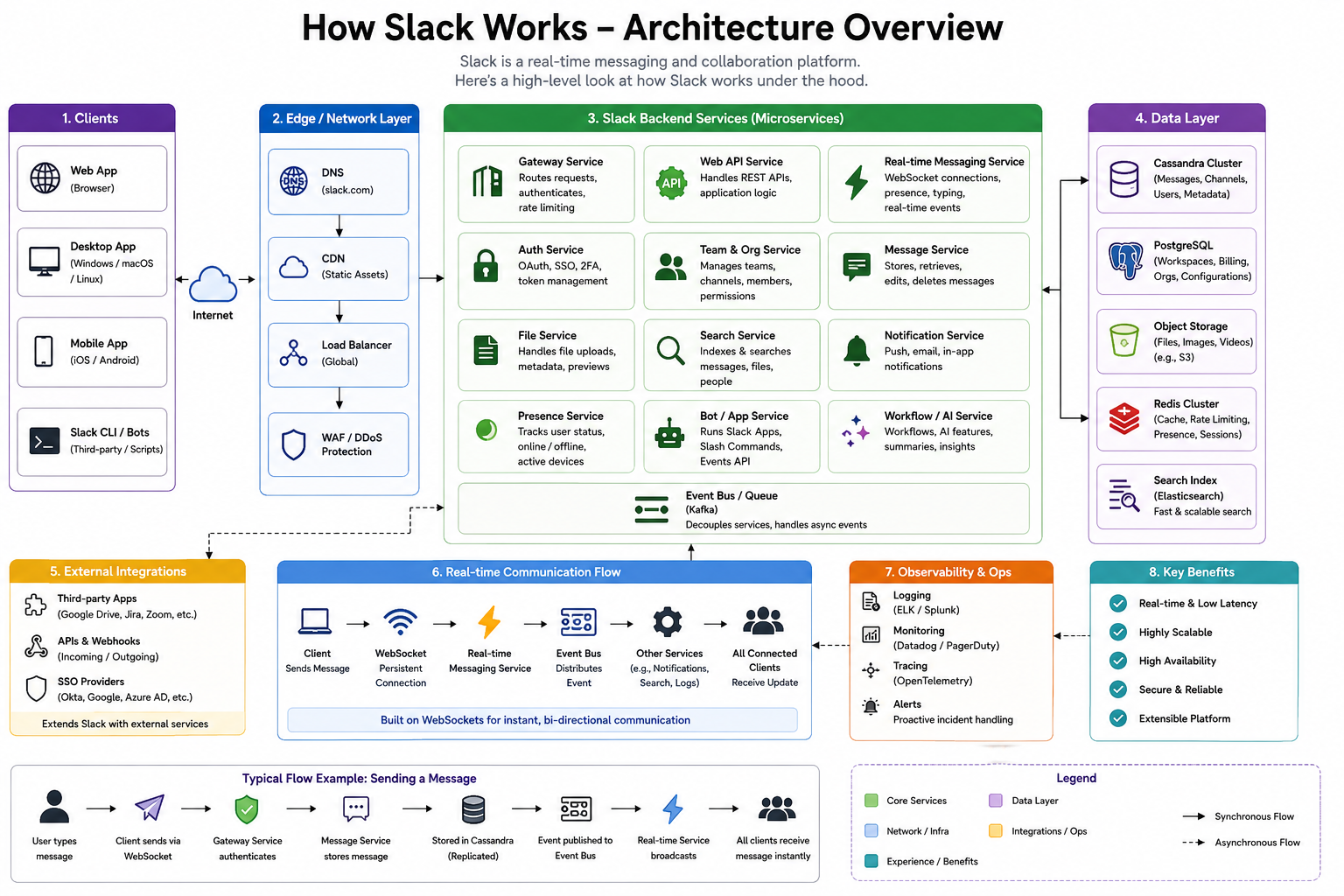
It Started as a Video Game
Here's a genuinely fun detail that turns out to explain a lot about why Slack is built the way it is. According to a breakdown on ByteByteGo, Slack's technical roots trace back to a browser-based MMORPG called Glitch. The game itself never took off commercially, but the internal communication tool the team built to coordinate while making it did and when Glitch shut down, that internal tool became the seed of what grew into Slack.
That inheritance shaped two lasting architectural habits, according to the same piece: a strong separation of concerns, where real-time messaging is handled by a dedicated system that's kept apart from the business logic much like how a game server keeps live player events separate from game rules and, as another write-up on Talent500 puts it, an early split between a dedicated channel server for real-time delivery and a separate web application for storage and authentication. It's a nice reminder that architecture decisions often outlive the product they were originally built for.
The Four Core Servers
Slack's own engineering blog, in a post called Real-time Messaging, describes the backbone of this system as four core Java services, each with one clear job:
- Channel Servers (CS) stateful, in-memory servers that hold the actual channel data and handle broadcasting messages to everyone subscribed.
- Gateway Servers (GS) the interface between a Slack client and the Channel Servers, holding user info and WebSocket subscriptions.
- Admin Servers (AS) stateless servers that sit between the web application backend and the Channel Servers.
- Presence Servers (PS) track who's currently online, powering the little green dot next to someone's name.
Imagine a busy restaurant. The kitchen (Channel Servers) actually prepares and plates every order. The waiters (Gateway Servers) are the ones actually standing at your table, taking your order and bringing you your food, without needing to know how the kitchen works internally. A back-office manager (Admin Servers) handles the paperwork side without ever touching a stove. And a separate greeter (Presence Servers) is just keeping track of who's currently in the building.
Getting Connected: What Happens When You Open Slack
You open the Slack app, and within a second, your unread messages, your channels, and your teammates' online status are all just... there. Slack's own blog walks through exactly how that happens.
When a client boots up, it first fetches a user token and WebSocket connection details from the Webapp backend described as a Hacklang codebase that also renders the actual Slack client interface. The client then initiates a WebSocket connection to whichever edge region is nearest to it, which gets routed by Envoy an open-source proxy Slack uses for load balancing and handling TLS to a Gateway Server. That Gateway Server then fetches the user's full channel list and other information from the Webapp, and sends the very first message down to the client to get it in sync.
Client boots up
  → Fetches auth token + connection info from Webapp
  → Opens a WebSocket to the nearest edge region
  → Envoy routes the connection to a Gateway Server
  → Gateway Server pulls the user's channel list from Webapp
  → Gateway Server sends the client its initial state
  → Persistent WebSocket connection stays open for real-time updates
That persistent connection is the whole trick behind Slack feeling "live." Instead of your client repeatedly asking the server "anything new? anything new? anything new?" every few seconds, the server just pushes new information down the same open connection the instant it happens.
Sending a Message: The Journey From Your Keyboard to Everyone's Screen
Here's where it gets genuinely interesting, and where an important design change tells a good lesson about trading a little bit of speed for a lot of safety.
A write-up on Talent500 explains that Slack's messaging path actually changed over time. Originally, messages went directly from the client to the channel server, which broadcast them and only persisted them to a database afterward fast, but risky, since a crash at just the wrong moment could lose a message the user had already seen marked as "sent." The fix was to change the order: the client now sends a message to the web app over a normal HTTP request, the web app logs and persists that message first, and only after it's safely stored does it hand off to the channel server for real-time broadcast.
It's the difference between shouting an announcement across a room before writing it down anywhere, versus writing it down in a notebook first, and only then reading it out loud. The second way is a little slower, but you can never lose the announcement, even if you get interrupted mid-sentence.
Slack's own blog describes what happens once that broadcast actually kicks off: a message sent in a channel travels through the Webapp API, to an Admin Server, to the relevant Channel Server, which then sends it out to every Gateway Server around the world that currently has a client subscribed to that channel. Each of those Gateway Servers then fans the message out over WebSocket to every one of its connected clients that's subscribed.
You hit send
  → HTTP POST to Webapp
  → Webapp persists the message (durability first)
  → Webapp hands off to an Admin Server
  → Admin Server notifies the correct Channel Server
  → Channel Server broadcasts to every subscribed Gateway Server, globally
  → Each Gateway Server fans the message out over WebSocket
  → It appears on every connected teammate's screen
A more detailed breakdown on ScaleWithChintan adds that this whole "one message, many recipients" pattern has a name in distributed systems: fan-out. Sending a single message to a channel with a thousand members means that one message needs to become potentially a thousand individual delivery events and Slack's architecture leans on tools like Apache Kafka as a durable, ordered queue in the middle of this pipeline, specifically so a sudden burst of messages doesn't overwhelm any single part of the system.
The Clever Trick: How 16 Million Channels Fit on One Machine
This is genuinely one of the more elegant ideas in the whole system, and it's worth slowing down for.
Here's the problem: Slack has an enormous number of channels and "channel," according to Slack's own blog, is actually a broader internal concept than just the channels you see in the sidebar; it also covers things like a specific user, a huddle, or a file. You obviously can't fit every single one of these on one server, and you don't want every server to have to know about every other server's business either.
Slack's own blog explains the solution: every channel's ID gets hashed, and that hash maps it to one specific Channel Server. At peak times, a single host ends up responsible for around 16 million of these channels. Imagine a massive library, where instead of one librarian trying to remember where every single book is, each book's title is run through a simple formula that always points to exactly one specific shelf no coordination meetings required, no checking with other librarians, just a consistent rule everyone trusts.
The really clever part is what happens when a shelf breaks. Slack's blog describes a system called CHARM (Consistent Hash Ring Manager) that manages this hashing scheme and can replace an unhealthy Channel Server in under 20 seconds. Because a given team's channels are deliberately spread out across many different Channel Servers rather than clustered on just one, losing a single server only causes a brief, localized blip a small number of teams see slightly delayed messages for well under 20 seconds, rather than a large chunk of the platform going down at once.
Handling the World's Time Zones
Usage isn't just "busy during the day, quiet at night" it's busier at different times depending on which part of the world you're looking at. The same blog post notes that on a typical workday, most users are online between 9am and 5pm local time, with visible peaks around 11am and 2pm and a small dip for lunch but because Slack operates globally, those peaks land at completely different points on a single global clock depending on the region.
Think of it like a relay race that never actually stops as one region's workday winds down, another's is just ramping up, so the system as a whole never really gets a quiet moment to rest. This is exactly why the architecture leans so heavily on horizontal scaling spreading load across many independent, replaceable machines rather than relying on any single, larger server that might have brief windows of low usage to recover in.
Handling Duplicate Messages and Reconnections
A relatable, very human problem: your Wi-Fi flickers for half a second while you're typing, your client quietly retries sending the message just in case, and now there's a chance the same message could get sent twice.
The same Talent500 breakdown explains Slack's fix: idempotency keys. Each message gets tagged with a unique identifier when it's created, and if the same message arrives twice because of a client retry, the server recognizes the duplicate key and quietly suppresses the second copy instead of showing it twice. The same piece notes this pattern extends further into the system's job-processing pipeline too, where Kafka handles durable, ordered message queuing acting as the system's permanent ledger while Redis handles fast, in-flight job data for the parts of the pipeline that need quick, temporary state rather than long-term durability.
Presence: The Green Dot That's Harder Than It Looks
It seems like such a small feature a little green dot next to someone's name but it hides a genuinely interesting scaling decision. A write-up on Medium explains that Presence Servers track which users are online, and this is the clever part a Slack client doesn't actually get notified about every single person's online status across the whole platform. It only receives presence updates for the specific subset of users currently visible on that person's screen at any given moment.
That's a small but meaningful optimization. Broadcasting every user's online/offline status to every connected client, all the time, would be an enormous, mostly wasted amount of traffic. Only sending updates for the handful of people you can actually see on screen right now keeps the system honest about what information is actually worth the cost of sending.
Multi-Region Resilience
An entire data center region goes down. What happens to everyone connected through it? The same Medium write-up notes that Gateway Servers, unlike the other core services, are deliberately deployed across multiple geographical regions, specifically so a client can connect to whichever one is nearest to it. When an entire region has problems, a draining mechanism seamlessly shifts affected users over to the nearest healthy region instead.
Think of it like a highway system with multiple bridges connecting two cities. If one bridge needs to close for repairs, traffic doesn't just stop it gets redirected to the next nearest bridge, and most drivers barely notice the detour.
Putting It Together
None of the individual pieces here are exotic. WebSockets aren't new. Consistent hashing isn't new. Durable message queues aren't new. What makes Slack's architecture genuinely impressive is how deliberately each piece was separated out to do exactly one job well a server that only tracks presence, a server that only manages channel broadcast, a hashing scheme that quietly spreads 16 million channels across a fleet without anyone needing to coordinate so that the end result, according to Slack's own blog, is a system that delivers messages across the entire world in about 500 milliseconds, scaling roughly linearly as more customers join.
What This Means Going Forward
As workspaces keep growing into organizations of hundreds of thousands of people, and as features like huddles, canvases, and AI-powered search get bolted onto the same real-time backbone, the fundamental challenge doesn't change: every new feature is, at some level, another kind of event that needs to reach the right subset of screens, instantly, without anyone waiting or losing a message along the way. The lesson underneath Slack's story is the same one running through every platform in this series: a product that feels instantaneous is almost always the visible tip of a system built, quite deliberately, to never make the user wait.
Read Next

How Telegram Actually Works
A deep dive into Telegram's architecture, the cloud-native design that syncs your chats across every device, the custom MTProto protocol built for hostile networks, and the radical team-size philosophy that keeps a billion-user platform running on a team you could fit in one conference room.
How WhatsApp Actually Works
A deep dive into WhatsApp's architecture, the decades-old telecom language behind its massive concurrency, the 'let it crash' philosophy that keeps it running through failures, and how a team of around 50 engineers served hundreds of millions of users.